Inbox
Conversation Assignment
Pick up queued conversations, assign organization members, and change who handles a chat.
The assignee is the person responsible for handling a conversation. Pick it up yourself, assign another member, or remove its assignee so it can wait in the support queue.
Muchat currently uses manual assignment. Round robin, workload-based assignment, support teams, and Inbox shift scheduling are not available in the current interface.
Pick up a conversation
Open the queue
In the Inbox, select Waiting for an agent and open a conversation. Read the earlier messages and contact details before picking it up.
Change the assignee
Open Assignee in the details panel and choose Assign to me.
Continue handling it
After the change succeeds, the conversation moves from pending to open and appears under Assigned to me. Write your reply in the same conversation.
Assign another member
Open the same assignee picker. Search by name or email and select a member. Options come from confirmed members of the organization. See Workspace management for invitations and membership management.
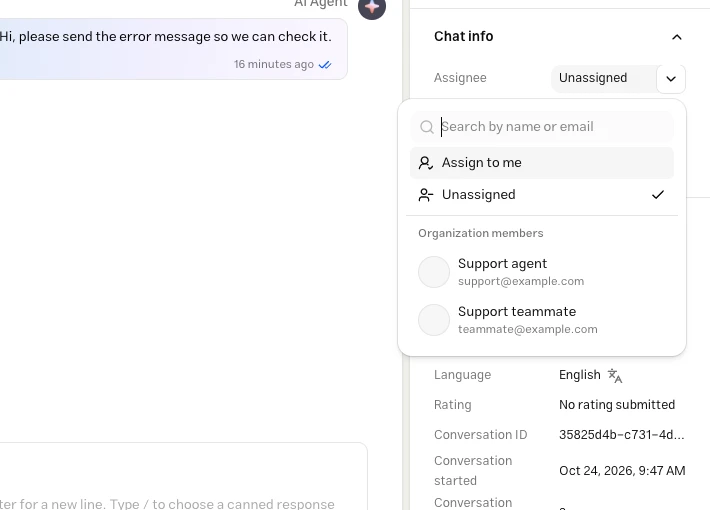
Choosing an assignee pauses automatic bot replies in that thread. Assigning a pending conversation opens it. Assigning a closed conversation does not reopen it; use Reopen Conversation to continue handling it.
Remove the assignee
Choose Unassigned to remove the assignee. If the conversation is open, it returns to Waiting for an agent.
Permissions and earlier threads
Assignment requires Manage Inbox permission and is changed from the latest thread. If you are reading an earlier archived thread, open the latest one first. Read-only channels do not offer assignment controls.
Changes to the assignee are recorded in conversation history. Check the updated name and status after assigning; an error means the change was not saved.
Troubleshooting
Check that their membership in this organization is confirmed. If member loading failed, select Try again. An unconfirmed invitation is not a selectable member.
This view shows only open and pending conversations assigned to you. Check for Closed or Snoozed status and verify the assignee.
A reply already being generated may finish. Assignment prevents subsequent automatic replies from starting. See Taking over from AI.