Inbox
Inbox Filters
Find conversations by assignee, channel, date, priority, labels, and unread messages.
Filters help you find conversations that need a particular kind of attention. The Inbox offers three ways to narrow a list:
| Method | Use |
|---|---|
| Built-in views | Choose all conversations, your assigned chats, the operator queue, or chats handled by AI |
| Custom views | Save a combination of conditions to use again |
| Archive | Find earlier threads using date, channel, assignee, and label filters |
Anatomy of a condition
A condition has a field, an operator, and, when needed, a value. For example, “Channel equals WhatsApp” selects conversations on that channel.
Open Add View, enter a name, and choose the field and operator in Query Builder. Select Create Inbox View to save the name and conditions.
Fields and operators
| Field | What it checks |
|---|---|
| Assignee | The member responsible for the conversation |
| Channel | Where the conversation originated |
| Priority | The current thread's importance |
| Created At | When the current thread began |
| Updated At | When the current thread last changed |
| Labels | Labels attached to the current thread |
| Message status | Whether the conversation has unread messages |
Operators by field
The operator list changes to match the selected field:
| Field | Available operators |
|---|---|
| Assignee | equals, not equals |
| Channel | equals, not equals |
| Priority | equals, not equals |
| Created At | less than, greater than, between, (x) days ago |
| Updated At | less than, greater than, between, (x) days ago |
| Labels | Has any of, Has all of, Has none of, Has no labels |
| Message status | Read, Unread |
For a field with multiple selections, several values in one “equals” condition mean any one can match. For example, select High and Urgent in one priority condition rather than joining two separate conditions with AND.
See Labels and Priority for details.
What the operators mean
- equals: at least one selected value matches, such as WhatsApp or Telegram.
- not equals: none of the selected values matches.
- Has any of: the conversation has at least one selected label.
- Has all of: all selected labels belong to the same thread.
- Has none of: none of the selected labels belongs to the thread; unlabeled conversations also match.
- Has no labels: the thread has no active labels. No value is needed.
For message status, simply choose Read or Unread, without entering another value. Date operators are explained under Dates.
Available values
Assignee
Choose one or more confirmed organization members by name in Assignee. For your own conversations, select your name. This condition checks the conversation's assignee; making a view personal does not automatically limit it to conversations assigned to you.
This filter has no separate Me or Unassigned option. For requests awaiting pickup, open the built-in Waiting for an agent view; that queue is different from all unassigned conversations.
Channel
The Channel list offers:
| Options | Conversations matched |
|---|---|
| Widget, Standalone, Playground | Conversations from the corresponding Muchat web interface |
| WhatsApp, Telegram, Instagram, Bale | Conversations from the selected messaging channel |
| Goftino, Crisp, Slack, Email | Conversations recorded through the corresponding connection |
| API | Conversations created through the API |
Selecting multiple channels in one equals condition matches conversations from any of them. Bale covers both Bale connection types. A channel's presence in the selector does not mean it is connected to your agent; results come only from this agent's existing conversations.
Priority and labels
For Priority, select one or more of Low, Medium, High, or Urgent. There is no No priority value.
For Labels, select labels belonging to this agent. To require both “Technical issue” and “Follow up,” select them in one Has all of condition. To exclude both, use Has none of. This differs from Has no labels because the conversation can still carry another label.
Combining conditions
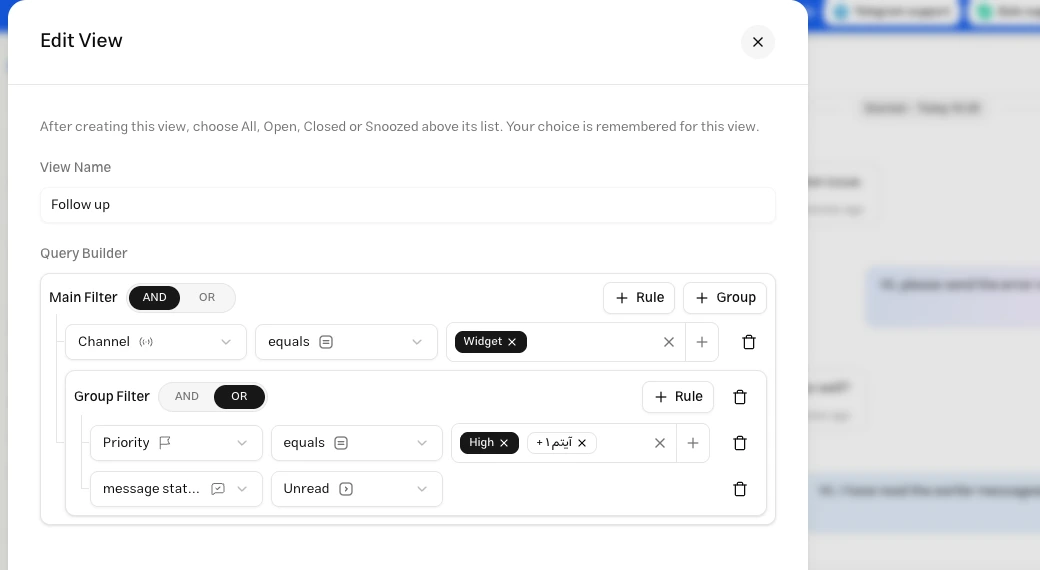
AND requires every condition in a group to match. OR requires at least one. Use a condition group to combine both.
To find WhatsApp conversations labeled “Follow up,” add Channel equals WhatsApp AND Labels has any of “Follow up.”
To find conversations with high priority or unread messages, use Priority equals High OR Message status is Unread.
To limit the previous example to WhatsApp, combine Channel equals WhatsApp AND a group containing Priority equals High OR Message status is Unread.
Dates
Day boundaries use UTC. between includes the entire start and end dates; the start must be on or before the end. less than selects times before the selected day begins, and greater than selects times after that day ends.
(x) days ago is dynamic: whenever the view is evaluated, it covers the start of that UTC calendar day through the current time. Enter a whole number, zero or greater: 0 means the start of today and 7 means the start of seven days ago. The input uses days; enter 14 for two weeks. It does not become a fixed date range as time passes.
Choose Created At for when the thread began and Updated At for its most recent change. Updated At is not a dedicated Last message filter; other conversation changes can update it too.
Conversation status and unread messages
In a custom view, choose All, Open, Closed, or Snoozed above the list. This selection is separate from the saved conditions. Open includes conversations waiting for an operator.
The unread filter includes unread messages across the conversation's threads. Opening its latest thread marks the conversation's messages as read for the team, so a conversation can leave an Unread view after you open it.
Troubleshooting
Check AND and OR. A conversation cannot have two different priorities at once; select several priorities in one condition. For labels, distinguish Has any of from Has all of.
Check the view name, condition values, and date order. The number of days must be a whole number, zero or greater. Remove empty groups nested inside another group. Negating a whole group and comparing one field against another are not supported.
Views evaluate the latest thread. Use the archive or Recent Conversations in the details panel to open an earlier thread.
Practical examples
Use AND between the conditions below. Choose the list status above the list after saving the view.
Recent WhatsApp requests
Channel equals WhatsApp AND Created At: (x) days ago, 1, with Open status.
This selects open or pending WhatsApp conversations whose current thread was created from the start of yesterday in UTC. That is not necessarily the last 24 hours.
Technical issues to follow up
Labels: Has all of “Technical issue” and “Follow up” AND Channel not equals Playground.
Both labels must belong to the same thread, and Playground conversations are excluded. This combines required labels with an excluded channel.
Uncategorized conversations
Labels: Has no labels AND Created At: (x) days ago, 7.
This finds recent conversations that have not been labeled yet. Adding the first label to the current thread means the conversation no longer matches Has no labels.
Keep a useful combination as a saved view. That guide also shows how to pair conditions with a list status and sort order.