AI Agent Management
Guardrails
Protect your Muchat agent from excessive messaging by limiting how many messages a contact can send within a time window.
Open your agent in the dashboard and go to Settings → Security. The Rate limit card lets you set the number of messages allowed within a time window and the message shown when the limit is reached. Click Save changes at the top of the page to save your edits.
Rate limit
Use Rate limit to cap how many messages a contact can send to your agent within a chosen time window. The limit is counted separately for each contact in each channel; it is not a combined total across all contacts or channels.
- Turn on the Rate limit toggle so its status reads Enabled.
- In the Limits to row, enter the number of allowed messages and the time window in seconds. Both values must be whole numbers greater than zero.
- Enter the text users should see in Limit reached message, for example: “Message limit reached. Please wait a moment and try again.” This text supports up to 1,024 characters. Leave it empty to use the default message.
- Click Save changes.
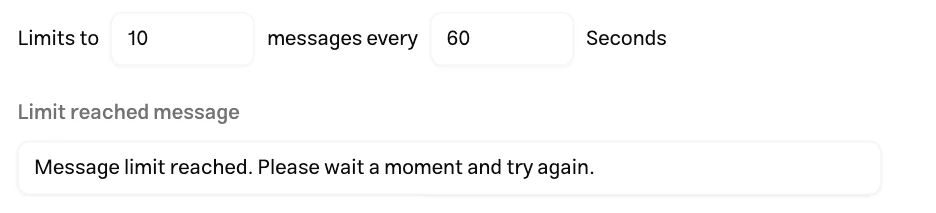
For example, with 10 messages every 60 seconds, a contact who has sent 10 messages in the last 60 seconds must wait for capacity before sending another message. As earlier messages fall outside that window, the contact can send messages again without starting a new conversation.
Messages over the limit are not sent to the AI to generate a reply. In the widget and standalone page, the user sees the limit message. Depending on the messaging channel, the user either receives a limit notice or the extra message is left unanswered; custom message delivery is not identical across channels.
To disable the limit, turn off the toggle on the same card and click Save changes.
Supported channels
The message limit applies to these channels and experiences:
- Chat widget, including the chat bubble, iframe, and the widget displayed through the Muchat WordPress plugin.
- Standalone page (Muchat Link).
- Telegram, Bale, WhatsApp, Instagram, Eitaa, and Rubika; both bot and account connections for Bale.
- Goftino.
- API channel; requests over the limit receive a
429response with the codeMESSAGE_RATE_LIMIT_EXCEEDED. TheRetry-Afterheader specifies the wait in seconds. - Playground; although this is an internal testing experience, its messages are also subject to the limit.
See Channels for available ways to deploy your agent.