Inbox
Conversation Priority
Inspect a conversation's recorded priority and use it in custom views.
Priority helps you review important conversations in a dedicated list. Each thread has a priority value, displayed in the Priority row of its details panel.
Levels
| Priority | Classification purpose |
|---|---|
| Urgent | Issues requiring immediate attention |
| High | Important issues to follow up sooner |
| Medium | Work with ordinary priority |
| Low | Less urgent issues |
Priority and status describe different things. Closed or Waiting for an agent indicates the stage of handling; priority indicates importance.
Filter by priority
Open a view
Create a custom view or edit an existing one.
Add a priority condition
In Query Builder, choose Priority and the equals or does-not-equal operator. Select one or more levels.
Check the results
Save the view and choose the appropriate list status, such as Open for requests being handled.
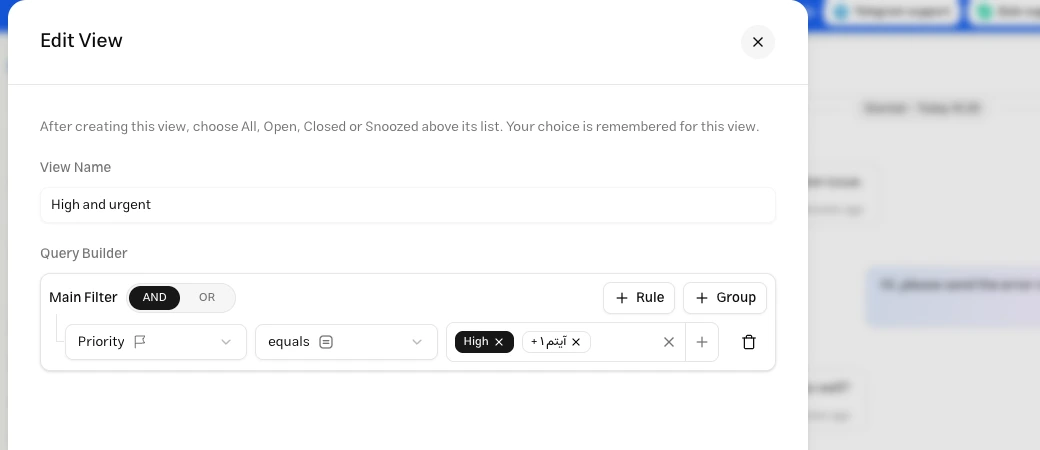
To include High and Urgent, select both in one condition. Joining separate High and Urgent conditions with AND returns no results.
Ordering and labels
The list currently sorts by creation date or last activity. After filtering priority, sort creation date ascending to review older items first. Sorting directly by priority is not available.
If your team needs to mark conversations manually while handling them, use Labels. Labels are independent of priority and can have their own saved views.