Inbox
Conversation Satisfaction Surveys
Collect feedback after handling a chat and review the score alongside its conversation history.
A satisfaction survey, or CSAT, helps you assess support from the customer's perspective. Ratings and comments are attached to the conversation. Read them alongside its messages to understand satisfaction or dissatisfaction.
When is it sent?
Prepare the survey action
Under Actions, create a Survey or edit the existing form. Configure the rating question and optional text comment, then publish and enable it.
Finish handling the conversation
After replying in the Inbox, select End Conversation. The resolution event runs the end-of-conversation form.
The customer responds
The widget and dedicated page display the form inside the conversation. Messaging channels send an invitation containing a form link.
Closing the widget window, requesting support, or changing the assignee does not itself resolve the conversation or run the survey.
Review feedback in the conversation
Open the conversation's details panel. When submitted, it shows the rating, text feedback, and rating time. Scores are recorded on a 1–5 scale. A missing response does not indicate dissatisfaction.
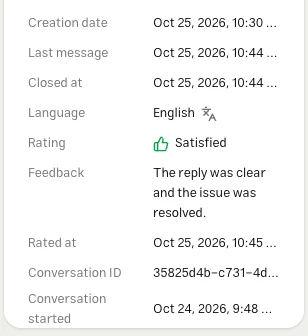
Rating and comment submissions also appear as conversation events. Check the thread the survey belongs to; the conversation may have started a newer thread since then.
Reports
| Location | Information |
|---|---|
| Conversation details | That conversation's rating and feedback |
| Reports → Form submissions | Complete answers, submission time, and additional form questions |
| Reports → Support quality | Aggregate conversation satisfaction |
See the Survey action guide for questions and form limits, and Analytics for interpreting reports.
Test and troubleshoot
Start a test conversation on a connected channel, exchange messages, then end it from the Inbox. Open the form or link, submit a score and comment, and check the conversation and form report. The editor preview alone does not test this flow.
If the survey does not appear, check that the action is enabled and the conversation was actually resolved. If submission fails, check required fields and whether comments are mandatory.