Channels
Telegram
Connect a Telegram bot to Muchat, configure its start message and streaming, and enable replies on behalf of your Telegram account.
Overview
Connect a Telegram bot so users can ask questions in its private chat. Muchat uses your agent’s configured knowledge, instructions, and actions. Conversations also appear in Muchat Inbox, where teammates can take over.
What you can do
Automate bot replies, set a start message, stream responses, and reply on behalf of a Telegram account by connecting that same bot to the account.
How to connect
Create a bot and get its token
Open BotFather in Telegram and use /newbot to create a bot. Choose its name and username, then copy its HTTP token. If you already have a bot, use that bot’s token.
Open Telegram in the dashboard
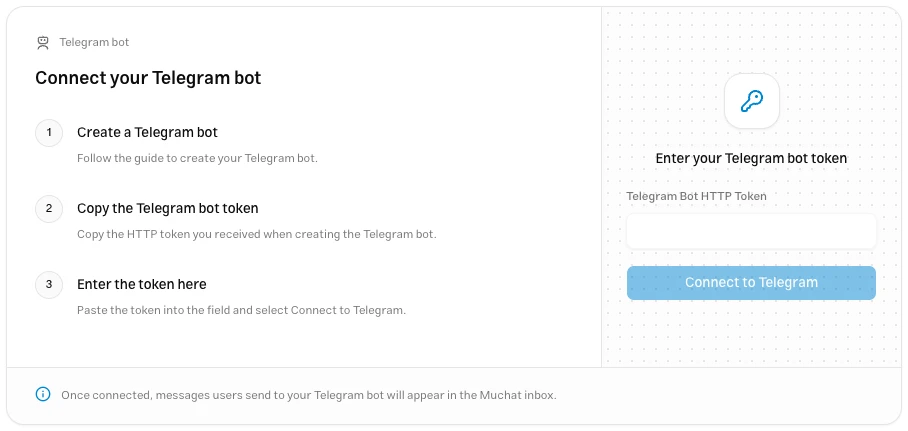
Choose your agent in the dashboard and go to Deploy → Telegram. Click Setup.
Submit the token
Paste it into Telegram Bot HTTP Token and click Connect to Telegram. Once verified, the connected bot’s settings appear.
Settings
| Option | Use |
|---|---|
| Start Message | Appears when a user sends /start in the bot’s chat. |
| Stream responses | Displays a preview while the answer is being prepared. When off, only the final reply is sent. |
Click Save Changes to apply changes. To test, open the bot with another user account, send /start, then ask a question covered by your agent’s knowledge. Check both the reply in Telegram and the conversation in Inbox.
Account connection
To reply in your own account’s conversations, connect the same Muchat bot to that Telegram account. No new token or channel is needed in Muchat.
- Enable Secretary Mode for the bot in BotFather.
- Open Chat Automation in the Telegram account’s settings and select the bot.
- Choose the accessible chats and grant Reply to Messages.
- Send a fresh message from another account and check receipt and replies.
Only the final reply is sent in this mode; the bot’s streaming setting does not change that. Replies require an active permission and an incoming message from the contact within the last 24 hours. If the account owner replies directly in Telegram, automatic replies stop in that conversation. See the official Telegram guide for permission details.
Troubleshooting
Copy the complete token for that bot from BotFather again and remove surrounding whitespace. The token is different from the bot’s username.
Check channel activation and send a fresh message. If it appears in Inbox, also check whether AI replies are paused or the conversation has been handed to a teammate.
Check the chosen bot, permitted chats, and Reply to Messages permission in Chat Automation. If account access is revoked, Muchat does not send a reply to that chat under the bot’s identity instead.